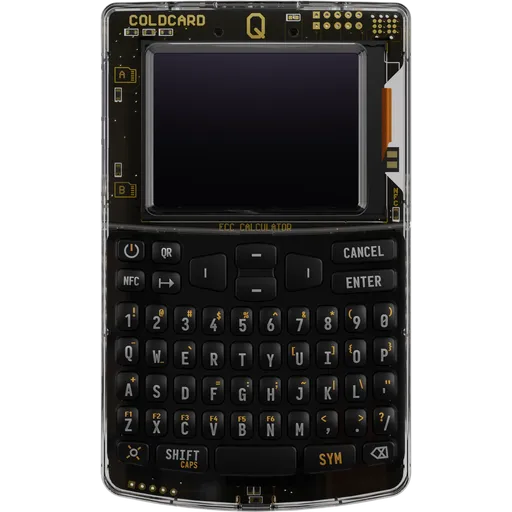
Coinkite Coldcard Mk5 ($219): Bitcoin-only signing device with two secure elements, a numeric keypad, NFC and microSD air-gap options, and source-available firmware.
By the WalletInsights editorial team
We may earn a commission from purchases through affiliate links. This does not affect our ratings. Affiliate Disclosure
Coinkite Coldcard Mk5 is a $219 Bitcoin-only signing device with two secure elements from different vendors, a 12-key keypad, NFC and microSD for air-gapped signing, and source-available firmware with reproducible builds. Its limits: no battery, Bluetooth or camera, an English-only interface and a steep learning curve. Seeds generated on firmware before 5.6.0 are affected by the July 2026 advisory. It fits experienced Bitcoin holders.
Security notice ·
July 2026: COLDCARD firmware generated weak seeds
A firmware build setting introduced in 2021 made COLDCARD devices generate seeds with a software random number generator instead of the hardware one. According to Coinkite, seeds created on the Mk4, Mk5 and Q carry about 72 bits of entropy rather than 128, and older Mk2/Mk3 firmware fared worse. Attackers began guessing and sweeping affected wallets on 30 July 2026; Galaxy Research confirmed more than 1,778 BTC stolen. Coinkite states the devices themselves were not hacked or remotely accessed.
Affected: seeds generated on Mk4/Mk5 firmware before 5.6.0, Q firmware before 1.5.0Q, Edge firmware before 6.6.0X / 6.6.0QX, and Mk2/Mk3 firmware 4.0.1–4.1.9. Seeds built from 50 or more private dice rolls are not at risk from this bug.
What Coinkite advises:
Install the fixed firmware before generating a new seed.
Move funds to a newly generated seed, even if you use a strong passphrase — updating firmware does not repair an existing seed.
Verify the new backup and a receive address on the device, send a small test transaction, then move the rest.
Current firmware is fixed; the risk remains for funds still held on seeds made with the affected versions.
Dual secure elements from two vendors: SE1 Microchip ATECC608C + SE2 Maxim DS28C36B; seed key split across MCU, SE1 and SE2
Open Source
Yes — firmware
USB Connection
Yes
Bluetooth
No
Supported OS
Windows, macOS, Linux, iOS, Android
Seed Phrase Length
24 words
Supported Networks
1+ networks
General Information6 items
Device TypeHardware Wallet
ManufacturerCoinkite
Release Year2026
Price$219
Bitcoin ModeBitcoin Only
Manufacturer supportsupport@coinkite.com
Security & Protection9 items
Secure ElementYes
Security CertificationDual secure elements from two vendors: SE1 Microchip ATECC608C + SE2 Maxim DS28C36B; seed key split across MCU, SE1 and SE2
Open SourceYes — firmware
Authenticity VerificationYes
PIN ProtectionYes
Passphrase SupportYes
Security auditsCoinkite describes the firmware as audited but publishes no Mk5-specific audit report; the 5.6.1 changelog cites a fix from a Karma-X security review. The July 2026 RNG bug went undetected from 2021 until exploited.
Known incidentsJuly 2026 seed-generation advisory (Coinkite, published 2026-07-30): since a March 2021 libngu migration, seed generation used MicroPython's software PRNG instead of the hardware RNG. On Mk4/Mk5 the secure-element TRNGs were still mixed in, so Coinkite estimates ~72 bits effective entropy (target 128) for seeds made on firmware before 5.6.0 (standard) / 6.6.0X (Edge) without at least 50 private dice rolls Mk2/Mk3 were far worse (~40 bits). Fixed in 5.6.0 (2026-07-31) 5.6.1 (2026-08-20) moved to SHA-256 Hash_DRBG and made user entropy mandatory. Upgrading does not repair existing seeds affected users must generate a new seed and move funds. Thefts totalling >1,000 BTC across COLDCARD models were reported (Bitcoin Optech). Later fixes: USB PSBT-swap after review and PSRAM readback (5.6.1), PSRAM out-of-bounds via compromised USB host (5.6.2).
PIN storagePIN checked by secure elements; attempt counter in SE1 cannot be reset; secrets encrypted with HMAC-SHA256-derived key split across MCU, SE1 and SE2
The Mk5 protects its master secret with two secure elements from different manufacturers, a Microchip ATECC608C and a Maxim DS28C36B, next to an STM32L4S5 microcontroller. According to Coinkite's security model, the key that encrypts the seed is split across all three chips. The secure elements check the PIN: after 13 wrong attempts the device is permanently bricked, and Coinkite states that nobody, including Coinkite, can reset the counter. During PIN entry the screen shows two anti-phishing words, so a swapped unit can be spotted before the second half of the PIN is typed.
The bootloader verifies the factory signature on every boot, lights a green or red LED and refuses downgrades. Builds are reproducible and release hashes are PGP-signed. Coinkite calls the firmware open source; its licence is MIT plus the Commons Clause, which makes it source-available rather than OSI open source. Coinkite also calls it audited but has published no Mk5 audit report; the 5.6.1 changelog cites a fix from a Karma-X security review. Units ship in a serial-numbered tamper-evident bag.
July 2026 advisory: since a 2021 firmware change, seeds were generated with a software PRNG instead of the hardware RNG. For Mk4 and Mk5 seeds made before firmware 5.6.0 without at least 50 private dice rolls, Coinkite estimates about 72 bits of effective entropy instead of 128. Every Mk5 shipped from March to July 2026 ran affected firmware. Version 5.6.0 fixed the bug; 5.6.1 mixes the hardware RNG with both secure elements and requires user entropy. Updating does not repair an existing seed.
SecurityKey Factor
The Mk5 creates standard BIP39recovery phrases of 12 or 24 words and imports phrases of 12, 18 or 24 words, so a backup is not tied to Coinkite hardware. Only the English BIP39 wordlist is supported. A BIP39 passphrase adds hidden wallets, BIP85 derives child seeds from the master secret, and Seed Vault keeps several temporary secrets in encrypted settings.
Beyond the words themselves, the device writes AES-encrypted 7z backups to microSD and can split a seed with Seed XOR. Firmware 5.6.3 (30 September 2026) added Codex32 (BIP-93) and Shamir splits into two to nine shares. Each scheme has its own restore procedure, and it is worth practising a recovery before relying on one.
There is no vendor backup, account or cloud service. A forgotten PIN cannot be reset, so after 13 wrong attempts the funds can only be restored from the seed and any passphrase. For seeds covered by the July 2026 advisory, a backup of the old phrase is not enough: Coinkite advises moving funds to a new seed generated on firmware 5.6.0 or later, even when a strong passphrase is used. Its recommended order is to verify the new backup and a receive address on the device, send a small test transaction, and then move the rest.
Recovery & backups
The Mk5 measures 86 × 50 × 9 mm without its sliding cover and weighs about 55 g. Input is a physical 12-key numeric keypad. The 1.54-inch monochrome screen sits behind Gorilla Glass and runs at 128 × 64 pixels; Coinkite's setup guide calls it an LCD, while the parts list and firmware refer to OLED. The plastic case comes in nine finishes, from clear to glow-in-the-dark.
There is no internal battery, so the device needs USB-C power whenever it is on. For air-gapped use, Coinkite lists USB battery packs without auto-shutoff, with transactions moved by microSD or NFC. A USB Virtual Disk mode presents the Mk5 as a 4 MB drive to macOS, Windows or an iPhone, and NFC passes PSBTs, addresses and xpubs to a phone with a tap.
The interface is English-only and menu-driven, with many advanced options. Setup involves matching the serial numbers on the bag, device and tear-off tab, choosing a two-part PIN and remembering its anti-phishing words, and adding dice rolls or other entropy when creating a seed. This suits careful users but takes longer to learn than app-guided wallets. There is no camera, so QR signing is not available. Compared with the Mk4, Coinkite lists a larger Gorilla Glass screen, a tougher case and better NFC performance; the firmware is the same.
Usability / UX
The Mk5 is Bitcoin-only: it does not support other coins, tokens, smart contracts or WalletConnect. It works as a PSBT signer (BIP-174 and PSBTv2) for third-party coordinators such as Sparrow, Electrum, Bitcoin Core and BlueWallet. Bitcoin Core can be set up fully air-gapped, but spending through it needs a USB connection and software such as HWI.
Multisig is a focus of the firmware. The Mk5 can act as an on-device multisig coordinator, imports wallets as output descriptors or as a Coldcard configuration file, and supports up to 15 co-signers. It exports xpubs and descriptors, and the screen shows the destination address before signing. Miniscript and Taproot are available only on Coinkite's experimental Edge firmware, not in the standard release.
With PushTX, any NFC-enabled phone can broadcast a signed transaction with a tap, without a companion app. COLDCARD Co-Signing adds spending policies with limits, timing and allowed destinations, plus optional 2FA. Duress and decoy PINs open a different wallet under pressure. Firmware updates install from microSD or over USB with Coinkite's command-line tool or the Electrum plugin. Users who want camera-based QR signing should look at the Coinkite Coldcard Q ($259.99), which adds a QR scanner; anyone holding other assets needs a different wallet.
Ecosystem & integrations
The Mk5 requires no account and no companion app, and Coinkite states that it never connects to the internet. The published bill of materials shows no Wi-Fi, Bluetooth or cellular radio, only a passive NFC tag. With no channel to send data, the device has no telemetry, and Coinkite receives no wallet metadata from it.
Privacy therefore depends on the software the Mk5 is paired with. Balances and history are shown in the coordinator, and its choice of server decides what third parties can see. Bitcoin Core lets users rely on their own node. PushTX broadcasts through the phone's browser, so the phone, not the device, contacts the network. Coinkite's Mk5 documentation does not address Tor or CoinJoin; such features, where available, come from the coordinator software.
On the device, privacy against physical coercion comes from passphrase-protected hidden wallets and duress and decoy PINs. The firmware lets the owner display the seed, export it as a SeedQR and back it up to microSD, so anyone who learns the PIN can also read the secret; keys are extractable by design. Since firmware 5.6.2, USB communication uses authenticated encryption. Users who keep the device on microSD or NFC only never connect it to a computer's data bus at all.
Privacy
Coinkite lists the Mk5 at $219, with $269 shown struck through; coldcard.com also shows $219. We evaluate the device at $219, checked on 26 October 2026, when the store listed it as in stock and said new units ship with corrected firmware.
For that price the hardware is focused rather than broad: two secure elements from different vendors, a keypad, NFC, microSD, a Gorilla Glass screen and a clear or coloured case. There is no battery, Bluetooth, camera or multi-asset support. The value lies in the firmware for Bitcoin users: multisig coordination, reproducible builds, Seed XOR and Shamir backups, Co-Signing spending policies and duress PINs, all without an account.
The Coinkite Coldcard Q ($259.99) costs about $41 more and adds a QR scanner for camera-based air-gapped signing. The Mk4 runs the same firmware without functional differences, so Mk4 owners would gain mainly the screen, case and NFC changes. The July 2026 advisory also belongs in the value judgement: the weakness went undetected from 2021 until it was exploited in 2026, despite public source code. It is fixed in current firmware, and buyers should confirm version 5.6.0 or later before generating a seed.
Price & value
The Coinkite Coldcard Mk5 offers, for $219, a Bitcoin-only signing device with two secure elements from different vendors, a physical keypad, microSD and NFC for air-gapped use, reproducible builds of source-available firmware, and a long list of advanced features: on-device multisig, Seed XOR and Shamir backups, BIP85, duress PINs and Co-Signing spending policies. It needs no account or companion app, and its only radio is a passive NFC tag. The trade-offs are clear: no battery, Bluetooth or camera, an English-only interface and a workflow that assumes the owner reads the documentation. The July 2026 seed-generation advisory weighs on the assessment. Every Mk5 shipped from March to July 2026 ran firmware that produced weaker seeds unless at least 50 private dice rolls were added. Firmware 5.6.0 fixed the bug, but it cannot repair seeds already created: their owners have to generate a new seed and move their funds. For experienced Bitcoin holders who keep firmware current, the Mk5 remains a focused, well-documented signer.
Buy this wallet if:
You hold only Bitcoin and want an air-gapped signer that works over microSD or NFC without a companion app.
You use or plan multisig and want an on-device coordinator with descriptor support.
You want backup options beyond a single phrase, such as Seed XOR, Codex32/Shamir shares or encrypted microSD backups.
Skip this wallet if:
You want QR-code signing with a camera: the Coinkite Coldcard Q ($259.99) adds a QR scanner.
You hold assets other than Bitcoin, or want a battery and Bluetooth for mobile use.
You are new to self-custody and prefer an app-guided setup in your own language.
✓Our Verdict
The Coinkite Coldcard Mk5 offers, for $219, a Bitcoin-only signing device with two secure elements from different vendors, a physical keypad, microSD and NFC for air-gapped use, reproducible builds of source-available firmware, and a long list of advanced features: on-device multisig, Seed XOR and Shamir backups, BIP85, duress PINs and Co-Signing spending policies. It needs no account or companion app, and its only radio is a passive NFC tag. The trade-offs are clear: no battery, Bluetooth or camera, an English-only interface and a workflow that assumes the owner reads the documentation. The July 2026 seed-generation advisory weighs on the assessment. Every Mk5 shipped from March to July 2026 ran firmware that produced weaker seeds unless at least 50 private dice rolls were added. Firmware 5.6.0 fixed the bug, but it cannot repair seeds already created: their owners have to generate a new seed and move their funds. For experienced Bitcoin holders who keep firmware current, the Mk5 remains a focused, well-documented signer.
Buy this wallet if:
You hold only Bitcoin and want an air-gapped signer that works over microSD or NFC without a companion app.
You use or plan multisig and want an on-device coordinator with descriptor support.
You want backup options beyond a single phrase, such as Seed XOR, Codex32/Shamir shares or encrypted microSD backups.
Skip this wallet if:
You want QR-code signing with a camera: the Coinkite Coldcard Q ($259.99) adds a QR scanner.
You hold assets other than Bitcoin, or want a battery and Bluetooth for mobile use.
You are new to self-custody and prefer an app-guided setup in your own language.
Ready to buy Coinkite Coldcard Mk5?
We may earn a commission if you purchase through our links. This doesn't affect our editorial independence.
Impermanent loss happens when asset prices in a liquidity pool diverge from external markets, reducing the value of liquidity providers' holdings compared to simply holding the assets.
Coldcard is an air-gapped hardware wallet for Bitcoin, made by Coinkite, that stores private keys offline and signs transactions without internet exposure.
A bootloader is a small program that initializes hardware and loads the main operating system or firmware on a device, often used in blockchain hardware wallets for secure startup.
A TRNG (True Random Number Generator) generates cryptographically secure random numbers using physical processes, crucial for secure key generation in blockchain and cryptocurrency.
A Random Number Generator (RNG) produces unpredictable numbers essential for cryptographic security in blockchain, such as generating private keys and nonces.
BIP39 is a standard for generating mnemonic seed phrases that are used to create deterministic wallets and securely back up cryptocurrency private keys.
Recovery is the process of restoring access to a cryptocurrency wallet using its seed phrase or mnemonic backup if the original wallet is lost or inaccessible.
A backup in cryptocurrency is a secure copy of a wallet's seed phrase or private keys. It enables recovery of funds if the original wallet is lost or damaged.
A passphrase is an additional security layer for cryptocurrency wallets, acting as a 25th word in the BIP39 seed phrase, protecting access to hidden wallets.
BIP85 is a Bitcoin Improvement Proposal for generating child seeds from a master seed, providing deterministic entropy for use in secure key derivation and backup processes.
Vendor Backup is a service by hardware wallet manufacturers that securely stores encrypted seed phrase shards with third parties, enabling recovery without self-custody of the full seed.
Bitcoin (BTC) is the first decentralized cryptocurrency, launched in 2009. It uses blockchain technology for secure, peer-to-peer digital transactions without intermediaries.
WalletConnect is a protocol that enables secure communication between decentralized applications (dApps) and mobile wallets through QR code scanning or deep linking.
PSBT (Partially Signed Bitcoin Transaction) is a Bitcoin transaction format that allows multiple parties to sign a transaction incrementally before finalizing it.
Electrum is a lightweight Bitcoin wallet that allows users to store, send, and receive Bitcoin securely. It is known for its speed and low resource usage.
BlueWallet is a mobile Bitcoin wallet that allows users to securely store, send, and receive Bitcoin. It offers features like Lightning Network support and multi-sig capabilities.
Multisig (multi-signature) is a security feature that requires multiple private keys to authorize a transaction, enhancing protection against unauthorized access in blockchain networks.
Taproot (BIP 341) is a Bitcoin upgrade that introduces Schnorr signatures and Tapscript, enhancing privacy by making complex scripts look like simple payments and improving efficiency.
A companion app is a software application used to manage and interact with cryptocurrency wallets or blockchain networks, typically offering features like transactions and security controls.
Two-Factor Authentication (2FA) secures cryptocurrency accounts and wallets by requiring two verification methods, such as a password plus a code from an authenticator app.
Telemetry in cryptocurrency and blockchain refers to the automatic collection and transmission of anonymous usage data, metrics, and error reports from wallets or nodes to improve software.
CoinJoin is a privacy technique in cryptocurrency where multiple users combine their transactions, making it harder to trace individual senders and receivers.
Reproducible Builds refer to the process where the same source code consistently produces identical binary outputs, ensuring verifiable and trustworthy software in blockchain and crypto projects.
Offline Signing refers to signing cryptocurrency transactions on a device that is not connected to the internet, ensuring private keys remain secure from online threats.
HODL is cryptocurrency slang for holding assets long-term despite price volatility, rather than selling. It originated from a 2013 forum post misspelling 'hold' as 'I AM HODLING.'
Self-custody means users control their own private keys to manage cryptocurrency assets directly, without third-party custodians. It embodies 'not your keys, not your coins.'
Coinkite Coldcard Mk5 uses a certified Secure Element chip to store private keys in tamper-resistant hardware. Even if the device's software were compromised, the Secure Element isolates your keys from extraction. The firmware is open-source, meaning security researchers worldwide can audit the code for vulnerabilities. The device has been independently security audited.
What if Coinkite goes out of business?
Coinkite's firmware is open-source — even if the company disappears, the community can maintain the software. Your seed phrase works with any BIP39-compatible wallet, so your funds are always recoverable.
What if I lose my Coinkite Coldcard Mk5?
Your cryptocurrency is stored on the blockchain, not on the device. If you lose your Coinkite Coldcard Mk5, you can recover full access using your seed phrase on any compatible wallet. Coinkite Coldcard Mk5 also supports Shamir Secret Sharing, letting you split your backup across multiple secure locations.
How long will Coinkite Coldcard Mk5 receive security updates?
Coinkite actively maintains Coinkite Coldcard Mk5 with regular firmware updates.
Is the Coinkite Coldcard Mk5 safe to use?
The Mk5 combines two secure elements from different vendors, a PIN that bricks the device after 13 wrong attempts, signed firmware checked on every boot and reproducible builds. Its main recent issue is the July 2026 seed-generation advisory: seeds created on firmware before 5.6.0 without at least 50 private dice rolls have less entropy than intended. Coinkite states that the devices themselves were not hacked or accessed remotely. A new seed generated on current firmware is not affected. Coinkite has not published a Mk5-specific audit report.
Is my Coldcard Mk5 affected by the July 2026 seed advisory?
Yes, if you generated your seed on the device before installing firmware 5.6.0 and did not add at least 50 private dice rolls. Every Mk5 shipped from March to July 2026 ran affected firmware. A firmware update alone does not repair an existing seed. Coinkite advises installing the fixed firmware, generating a new seed, verifying the backup and a receive address on the device, sending a small test transaction and then moving all funds, even if you use a strong passphrase.
Is the Coldcard Mk5 open source?
The firmware and bootloader source, the schematic and the bill of materials are public on GitHub, and builds are reproducible, so users can check that the released firmware matches the code. Coinkite calls the firmware open source, but its licence is MIT plus the Commons Clause, which withholds the right to sell it. That makes it source-available rather than open source under the OSI definition. Anyone can still read, build and verify the code.
Does the Coldcard Mk5 have Bluetooth, and can it work air-gapped?
It has no Bluetooth, Wi-Fi or camera. Air-gapped signing works by moving PSBTs on a microSD card or by tapping an NFC phone. The device still needs USB-C power, which can come from a battery pack without auto-shutoff. A USB data connection, including a Virtual Disk mode, is available but optional. QR-code signing is not supported; the Coinkite Coldcard Q adds a QR scanner.
How do I back up the Coldcard Mk5?
The device generates a standard BIP39 recovery phrase of 12 or 24 words, which you write down and verify. Optional extras include a BIP39 passphrase, encrypted microSD backups, Seed XOR and, since firmware 5.6.3, Codex32 and Shamir splits into two to nine shares. A forgotten PIN cannot be reset by anyone, so the recovery phrase and any passphrase are the only way back to the funds.
Coldcard Mk5 or Mk4: what changed?
Both run the same firmware without functional differences, so multisig, Seed XOR and the new Shamir backups work on both. Coinkite lists the Mk5's changes as a 1.54-inch screen behind Gorilla Glass, a tougher case and better NFC performance, with a processor from the same family. Both models were covered by the July 2026 advisory and fixed in firmware 5.6.0. For Mk4 owners, the upgrade is about hardware comfort, not new security functions.
Coldcard Mk5 or Coldcard Q: which should I choose?
Both are Bitcoin-only signing devices from Coinkite. The Mk5 ($219) uses a numeric keypad and relies on microSD, NFC and USB to move transactions. The Coldcard Q ($259.99) adds a QR scanner for camera-based air-gapped signing, which the Mk5 lacks. If your coordinator software works with microSD or NFC and you do not need QR codes, the Mk5 costs less.
Some links on this page are affiliate links. If you purchase through them, I may earn a commission at no additional cost to you. This helps support the site and allows me to continue creating detailed, independent reviews.
Our rating methodology is evolving. Ratings and assessments will be refined as we improve our scoring framework to reflect the most accurate results.
Ready to Secure Your Crypto?
Find the right hardware wallet based on your needs, budget, and security priorities.